Display History of Housekeeping Service Changes in Reservations

Stay is enhanced to display the changes made to the housekeeping pattern, housekeeping services, and housekeeping guest services of reservations. For example, if a reservation originally had a daily stayover service and the guest opted out of the service on the second night of stay, users can easily see the changes made in the History section of the reservation.

The following changes are made to support this feature:

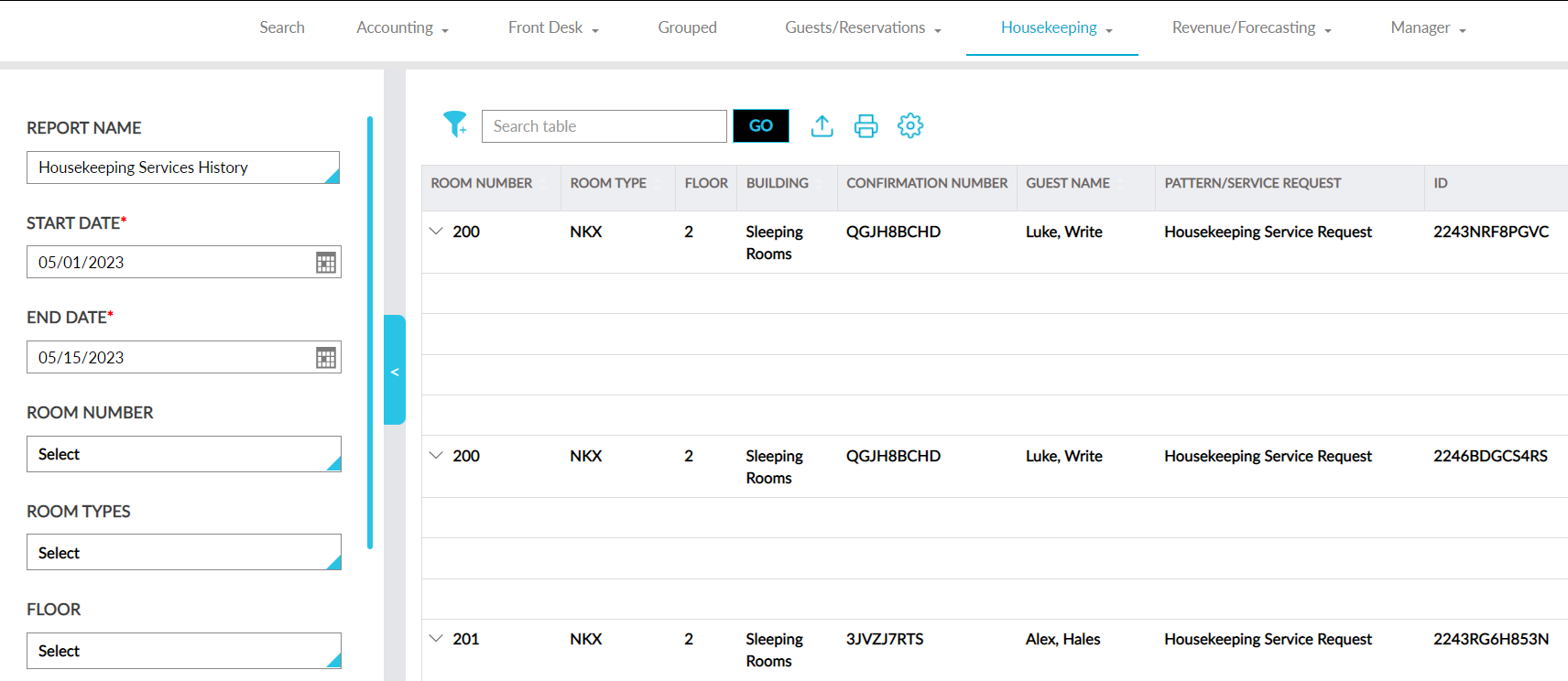
  • A new Dynamic report, Housekeeping Services History, added to the Housekeeping section of the Dynamic Reports screen (Reports Dynamic Reports Housekeeping Housekeeping Services History).

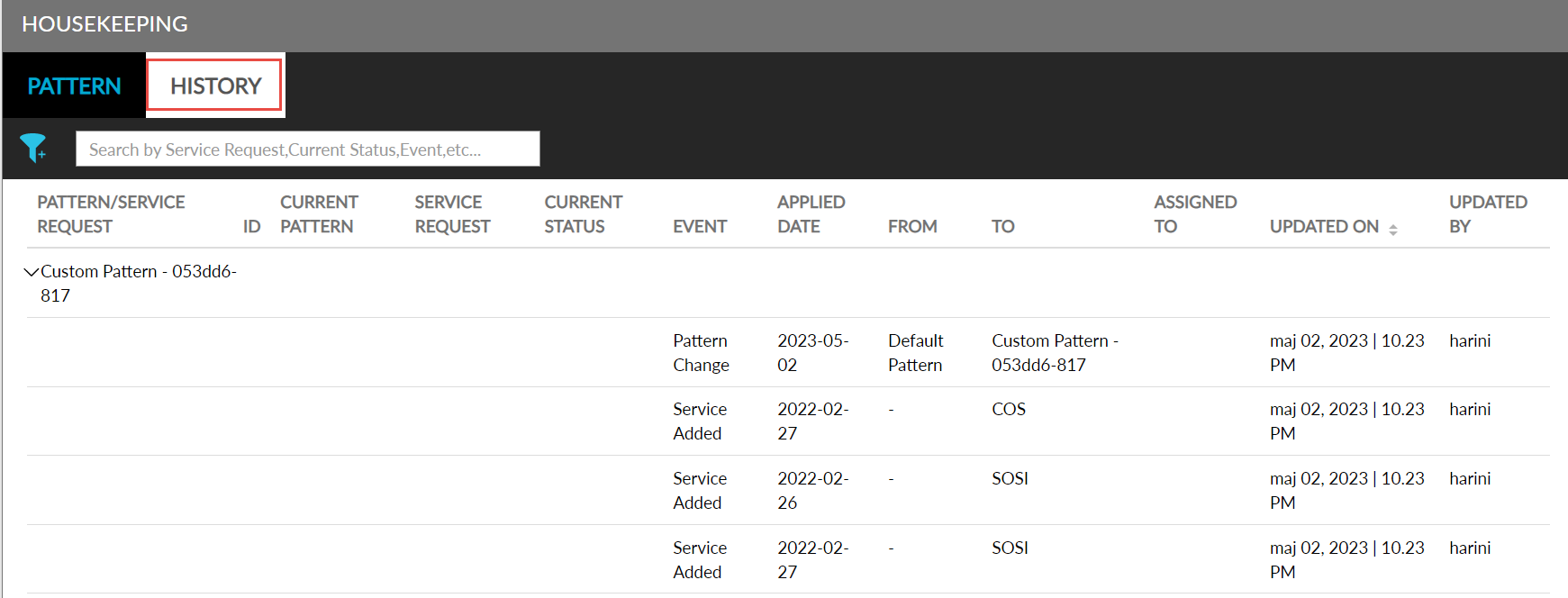
  • A new tab, History, is added to the Housekeeping section of the reservation (Reservation SVC History).

Housekeeping Services History Report

The Housekeeping Services History Report tracks the history of changes made to the housekeeping pattern, housekeeping services, and housekeeping guest services of reservations.
A screenshot of a computer

Description automatically generated with medium confidence

History Tab

The History tab displays the following information:

  • Field

  • Description

  • Pattern/Service Request

  • Displays the following type of housekeeping service that is updated:

  • Housekeeping Pattern: Displays the changes made to the housekeeping pattern of the reservation. By default, changes made to the housekeeping pattern is displayed at the top, above the changes made to the housekeeping service requests and housekeeping guest service requests.

  • Housekeeping Service Request: Displays the newly created housekeeping service requests and the updates made to the existing service requests.

  • Housekeeping Guest Service Request: Displays the newly created housekeeping guest service requests and the updates made to the existing service requests.

  • ID

  • Displays the service request ID as a hyperlink. When clicked, the Edit Services screen is displayed, where users can update the details of the service request. For housekeeping pattern updates, this field is left blank. Users can search for a record using this column.

  • Current Pattern

  • Displays the name of the latest housekeeping pattern applied to reservations. For housekeeping service requests and housekeeping guest service requests, this field is left blank.

  • Service Request

  • Displays the latest service request for the ID. For housekeeping pattern updates, this field is left blank. Users can filter and search records using this column.

  • Current Status

  • Displays the latest status of the service request. For housekeeping pattern updates, this field is left blank. Users can filter and search records using this column.

  • Event

  • Displays the following events and users can filter and search records using this column:

  • Pattern Change: This event is displayed when the housekeeping pattern is changed from one existing pattern to another.

  • Service Added: This event is displayed when a new service is added to the existing housekeeping pattern of the reservation.

  • Service Update: This event is displayed when the scheduled date of a service in the housekeeping pattern of a reservation is modified.

  • Service Removed: This event is displayed when an existing service is removed from the housekeeping pattern of a reservation.

  • Service Request Created: This event is displayed when a new service request (housekeeping service/housekeeping guest service) is created for the reservation.

  • Staff Assignment: This event is displayed when a staff is moved from assigned status to unassigned, or from unassigned status to assigned, for a housekeeping service/housekeeping guest service.

  • Staff Update: This event is displayed when an assigned staff name is changed for a housekeeping service/housekeeping guest service.

  • Status Update: This event is displayed when the status is updated for a housekeeping service/housekeeping guest service request.

  • Severity Update: This event is displayed when the severity of the status is updated for a housekeeping service/housekeeping guest service request.

  • Service Change: This event is displayed when the service type is changed for the requested housekeeping service/housekeeping guest service.

  • Status Update: This event is displayed when the status of the housekeeping service/housekeeping guest service request is changed.

  • Scheduled Date & Time Update: This event is displayed when the scheduled date or time of a housekeeping guest service request is added or updated.

  • Applied Date

  • Displays the date for which the updated event is being applied for.

  • From

  • Displays the original date of the mentioned event that is being changed. This column also displays the No/Limited Service icon for the services marked as No/Limited Service.

  • To

  • Displays the modified date of the mentioned event. This column also displays the No/Limited Service icon for the services marked as No/Limited Service.

  • Assigned To

  • Displays the name of the staff to whom the service request is assigned. When staff is not assigned, and for housekeeping pattern changes, this field is left empty. Users can filter and search records using this column.

  • Updated On

  • Displays the date and time of the update. This column can be sorted. Users can filter records using this column.

  • Updated By

  • Displays the username of the user who updated the service or pattern. For system updates, the username is displayed as System. Users can filter and search records using this column.

Multiple updates made to the same Pattern/Service Request are displayed inside an accordion. When collapsed, only the ID, Current Pattern, and Status details are displayed. When expanded, all the column details are displayed.

All the column details are displayed in descending order with the last updated ID listed at the top and its event details also displayed in descending order.
A screenshot of a computer

Description automatically generated